
Breaker Box: Panel Directory
Brett PappasHouse & Home
4.346.00 Reviews
- Version
- 2.6.0
- Installs
- 10.00K
- Age Rating
- Everyone
Screenshots
Our Review of Breaker Box: Panel Directory
 Analysis by Appyee
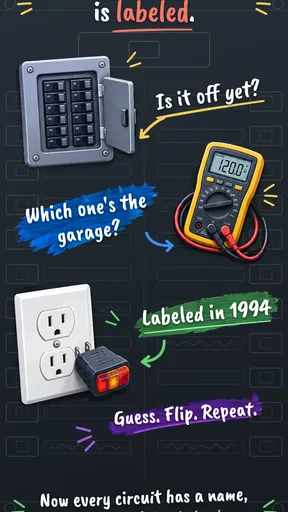
Ever found yourself squinting at a jumble of switches in a breaker box, wondering which one controls the oven and which one dims the living room lights? Well, that's where Breaker Box - Panel Tool steps in to make your life a whole lot easier. This app is like having a digital assistant for your electrical panel, and trust me, once you get the hang of it, you'll wonder how you ever managed without it. But let's dive deeper, shall we?
Deciding What You Need from a Panel Tool
A breaker panel map is most useful when it helps you answer a practical question quickly: which circuit should I check before I change a light fixture, reset an appliance, or explain the house to someone else? I would judge this app by how clearly it helps you connect a physical switch to a room or device, and how easy it is to keep that information current. It is a record-keeping aid, not a replacement for safe electrical work or a qualified electrician.
That distinction matters. A phone can help you organize what you have learned about a panel, but a label in an app does not prove that a circuit is correctly identified. If you are unsure, verify the circuit carefully and use a professional for work beyond your ability. The app makes the notes easier to consult; it does not make an uncertain electrical situation safe by itself.
The app is a free House & Home tool from Brett Pappas. It has a 4.3 average from 96 ratings, with 43 written reviews, and has passed 10K+ installs. It is rated Everyone and was released on January 1, 2023; version 2.3.0 requires OS 7.0 or later. Those details make it approachable for ordinary household use, while the $8.99-per-item in-app purchases are worth checking before you decide whether its available options suit your needs.
Where Breaker Box - Panel Tool Fits Best
First things first, installing Breaker Box - Panel Tool is a breeze. Whether you're on Android or iOS, just head over to the app store, hit download, and you're good to go. Once you open the app, you'll be greeted with a clean and intuitive interface. It's like the developers knew exactly what we needed—no unnecessary fluff, just straightforward functionality.
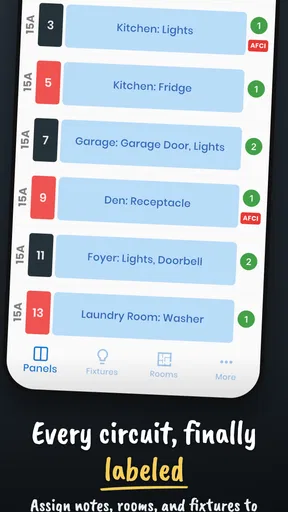
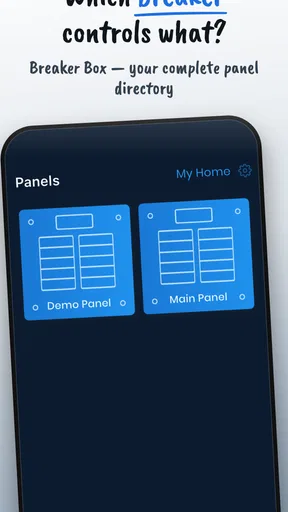
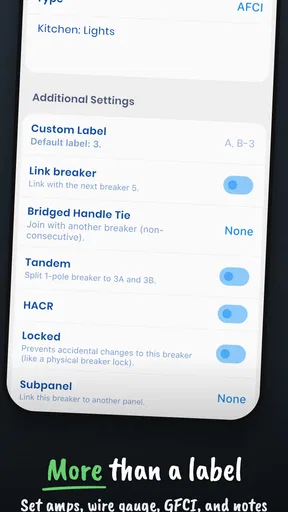
Setting up your breaker box is as simple as snapping a photo. The app uses your phone’s camera to capture and identify the layout of your panel. It then allows you to label each switch with custom tags. So, instead of "Switch 1," you can have "Kitchen Lights." Pretty neat, right? It’s like having a personal electrician at your fingertips.
Building a Map You Can Trust
The photo is a useful starting point, but I would treat it as a visual reference rather than a substitute for testing circuits. A panel’s handwritten labels may be incomplete, and rooms can contain outlets or fixtures connected to more than one circuit. Before relying on a label, check it against the actual circuit in a controlled way, then write down what you confirmed. That extra care is especially valuable in older homes or after renovations.
A practical workflow is to work through the panel when there is no urgent repair waiting. Take a clear photo, then identify one breaker at a time and label it with a specific location and load, such as “hallway lights” or “laundry outlet,” rather than a vague room name. If a circuit serves several places, say so in the label. This makes the map more useful later, when you may be in a hurry and cannot remember which outlet was part of the same run.
There is also a trade-off between detail and readability. A very short label is easy to scan but may not distinguish two similar circuits; an overly long one can be harder to read on a phone. I would use concise names and reserve extra notes for unusual connections. If you discover a label was wrong, update it promptly instead of leaving both the old and new descriptions in circulation.
The Nitty-Gritty of Features
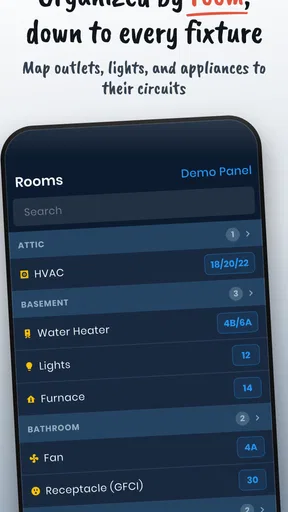
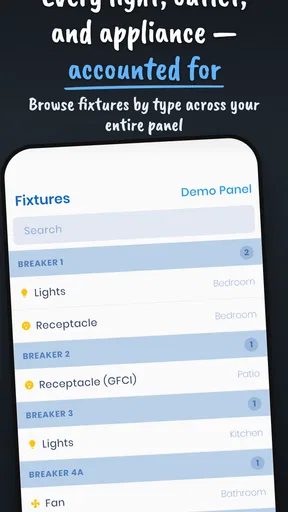
Now, onto the nitty-gritty of what this app offers. Once you’ve labeled all your switches, you can easily search and find which switch controls what. This is especially handy during power outages or when you’re doing a bit of DIY around the house.
Search is most helpful when your labels use words you will actually remember. If you call a space “back bedroom” in conversation but label it “guest room,” you may hesitate when trying to find it quickly. I would settle on familiar names and use the same wording consistently across rooms, outlets, and appliances. That small naming decision can make a larger panel far less frustrating to navigate.
But wait, there's more! The app also keeps track of any changes you make. So, if you ever swap out appliances or renovate, you can update the labels without hassle. It’s like a digital logbook for your home’s electrical system.
That change history is only as useful as the habit behind it. After an electrician adds a circuit, or after you move a major appliance, take a moment to revise the relevant label while the work is fresh in your mind. A panel map can quietly become misleading if it is treated as a one-time setup. I would also keep the physical panel’s existing markings intact where possible, so the phone is a convenient companion rather than the sole record.
One feature that I absolutely love is the ability to share your panel’s layout with others. If you’ve got a house sitter or need to send someone to check on your home, you can easily share the panel map. It's these little touches that make Breaker Box - Panel Tool stand out from the crowd.
When Sharing Helps—and When It Needs Care
Sharing is particularly practical for a household where one person usually handles repairs but another may need to act when they are away. A house sitter can benefit from clear, plain labels if a breaker trips, and a family member can find the right circuit without calling around. Before passing a map along, I would check that the labels are current and that the recipient understands it is a guide, not permission to do electrical work.
Think about what the map reveals, too. A panel layout can indicate where important equipment or rooms are, so share it with people who have a genuine reason to use it rather than treating it as a public document. For a short visit, a simple explanation of the relevant circuit may be enough; for someone responsible for the home over a longer period, a complete, accurate map is more useful.
A Real Household Use Case
Picture a weekend when a bathroom light stops working just as you are getting ready to replace its bulb or inspect the fixture. Instead of asking someone to flip breakers while you watch the light, you can search the room label and consult the panel map, then identify the circuit to verify. If the label is specific and trustworthy, that saves time and avoids switching off unrelated parts of the house. If the label is uncertain, the app also makes the gap visible: you know what still needs checking rather than relying on a guess.
The same routine can help after a move. A renter who has permission to document the panel can make a useful reference for day-to-day questions, while a homeowner can build on the map whenever the electrical setup changes. In either case, I would avoid treating the app as a substitute for the landlord’s instructions, building documentation, or professional advice when a problem seems serious.
Why You'll Love It
Okay, so why should you download this app? Imagine never having to guess which switch belongs to what again. No more accidental power cuts to the fridge when you’re trying to fix the bathroom light. Plus, the app's design is so user-friendly that even the least tech-savvy among us will find it a breeze to use.
Another bonus is the peace of mind it brings. Knowing exactly what’s what in your breaker box means you can handle electrical issues more confidently. Plus, it’s a lifesaver during emergencies. If you need to shut off power to a particular area quickly, you can do so without hesitation.
I would keep that confidence measured, though. In an urgent situation, finding the right label quickly is helpful, but it cannot guarantee that a circuit is safe to touch or that the problem is minor. For a burning smell, visible damage, repeated trips, or any situation that feels unsafe, step away and contact a qualified professional or emergency service as appropriate. The app’s strongest role is preparation: recording information before a stressful moment arrives.
How It Compares with Other Ways to Keep Track
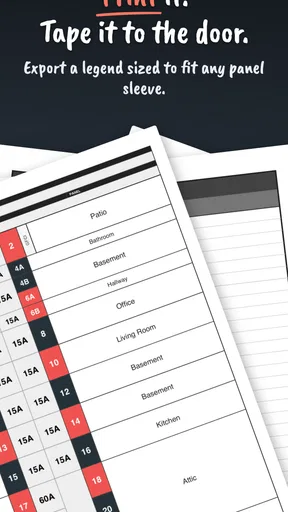
The usual alternative is a handwritten panel legend, often taped inside the door or written beside the breakers. That can be faster to consult without opening a phone, and it remains available if your battery is dead. But handwritten notes can be cramped, hard to revise neatly, or lost when someone changes the panel. The app’s photo-based record, searchable labels, and ability to share the layout make it a better fit for people who want a portable record they can update.
A notes app or a folder of panel photos can also work, especially if you already use one system to organize household information. Those options may be preferable if you want everything in one place and do not need a dedicated panel map. Their drawback is that you may have to build the structure yourself, and a plain list of breaker names is less immediately useful if it does not clearly correspond to the physical arrangement.
For a single small panel with a tidy, accurate legend, a dedicated app may feel like more organization than you need. For a household with confusing labels, frequent changes, or several people who need access to the same information, having a searchable and shareable reference is more compelling. I see this tool as a middle ground: more practical than an unstructured note, but not a substitute for formal electrical documentation or professional inspection.
Limits, Setup Friction, and the Cost of Switching
The first meaningful task is not downloading the app; it is making a reliable map. Photographing a panel and entering labels takes attention, and a rushed setup can preserve mistakes in a cleaner-looking format. If the switches are poorly marked or the circuits are difficult to test, you may need time and help before the app becomes genuinely useful. That is a real setup cost, not a flaw the interface can solve.
There is also a small ongoing cost in keeping the information accurate. Each time a room is altered or an appliance changes circuits, the map needs review. If you prefer not to maintain a digital record, a simple physical legend may suit you better. The app is free to start, but in-app purchases are listed at $8.99 per item, so I would inspect the options in the app and decide whether any paid item is relevant before spending.
Switching from an existing paper list does not have to mean throwing it away. I would photograph the current markings, compare them against what can be confirmed, and then build the digital labels gradually. Keeping the paper reference nearby during that process gives you a fallback and makes discrepancies easier to spot. Once the app’s map has been checked, you can decide whether maintaining both records is worthwhile for your home.
Who Should Choose It
This is a sensible choice for homeowners who want a searchable circuit reference, renters who are allowed to document their panel, and households where more than one person may need to locate a breaker. It is also useful for someone preparing a home for a sitter or simply trying to replace cryptic labels with names that make sense to the people who live there. The age rating is Everyone, but the practical benefit depends less on age than on whether the user can safely identify and label circuits.
I would skip it if you want an app to diagnose electrical faults, operate breakers remotely, or tell you whether a repair is safe. It is also a weaker fit if your panel is already clearly documented and you rarely need to consult it. People who prefer paper, do not want to maintain household records on a phone, or cannot confidently verify the circuits may be better served by keeping a physical legend and asking an electrician to clarify it.
Wrapping It Up
So there you have it, folks. Breaker Box - Panel Tool isn’t just an app; it's a game changer for anyone who’s ever felt a pang of confusion staring at a breaker panel. Whether you're a homeowner, renter, or just someone who likes to be prepared, this app is worth every megabyte. So why not give it a try? Download it today and take the guesswork out of your electrical panel once and for all.
Ready to make your life easier? You can find the download links for both Android and iOS on our website. Trust me, this little tool is about to become your new best friend.
My recommendation is to start with one panel, make a careful map, and see whether the search and sharing fit the way your household handles maintenance. If the setup helps you replace uncertain scribbles with accurate, usable labels, it earns a place in your home toolkit. Just keep the record current and remember that better organization is not the same thing as electrical expertise.
Verdict
Strengths of Breaker Box: Panel Directory
- User-friendly interface for easy navigation.
- Real-time monitoring of electrical load.
- Customizable alerts for circuit issues.
- Supports multiple panel configurations.
- Offline access to saved panel data.
Limitations of Breaker Box: Panel Directory
- Limited compatibility with older devices.
- Subscription required for premium features.
- No integration with smart home systems.
- Occasional sync issues with cloud storage.
- Lacks detailed user tutorials or guides.
Similar Picks in This Category
View All
Universal TV Remote Control
CodeMatics Media Solutions3.9

AlfredCamera Home Security app
Alfred Systems Inc.4.7

Planner 5D: AI Home Design
Planner 5D4.5

Universal Tv Remote-Cast to TV
One Music Player4.1

Zillow: Homes for Sale & Rent
Zillow Group4.8

99acres Buy/Rent/Sell Property
infoedge.com4.3
Frequently Asked Questions
What is Breaker Box - Panel Tool used for?
Breaker Box - Panel Tool is designed to help users manage and organize their electrical panel information efficiently. It allows users to label circuits, track electrical usage, and even troubleshoot issues within their breaker box. It's an essential tool for homeowners and electricians who need quick access to panel details.
Is Breaker Box - Panel Tool user-friendly for beginners?
Yes, Breaker Box - Panel Tool is designed with a user-friendly interface that makes it accessible for both beginners and experienced users. The app provides intuitive navigation, clear instructions, and helpful tips to ensure that users can easily input and manage their electrical panel information without any technical expertise.
Can I customize the information within the app?
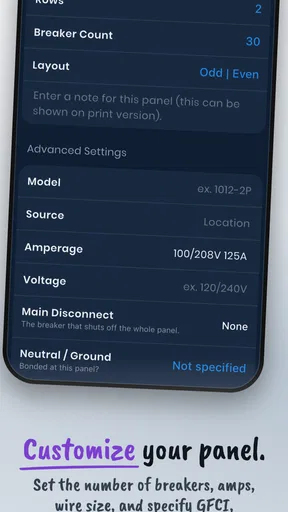
Absolutely! Breaker Box - Panel Tool allows for extensive customization. Users can label each breaker according to their specific circuit needs, add notes, and even attach photos. This customization ensures that all your panel information is organized and easy to understand, tailored to your individual preferences.
Does the app work offline, or is an internet connection required?
Breaker Box - Panel Tool is designed to work both online and offline. You can access and update your electrical panel information without an internet connection, making it convenient for use in basements or areas with poor connectivity. Any updates will sync once you’re back online.
Is my data secure within Breaker Box - Panel Tool?
Yes, your data security is a top priority. Breaker Box - Panel Tool uses advanced encryption methods to protect your stored information. Additionally, the app offers backup options to ensure that your data is safe and recoverable in case of device loss or failure.
